A

Links, files, and windows go straight to the right place

AppCat routes links, files, apps, and individual windows to the right place without making you clean up the context afterward.

macOS applink and file routingwindow switcheropen source
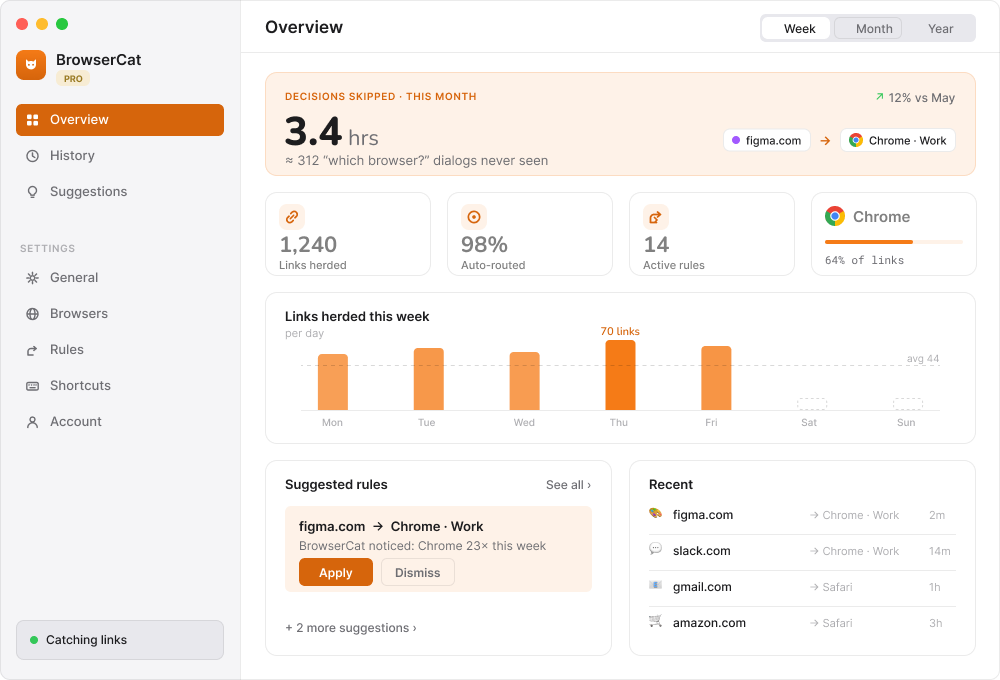
AppCat macOS overview with routing history and suggested rules
Product stance

The routing context stays on your Mac

Rules, history, and statistics stay on the Mac. AppCat has no accounts, telemetry, or tracking. It only makes functional requests for favicons, page titles, redirects, and updates.

Workflows

What happens from action to outcome

Choose the right destination for a link

Problem: A work link, personal link, or deep link should not all open in the same browser session.

Outcome: Choose a browser, profile, or compatible native app from one picker.

  1. Open a link
  2. Pick a browser, profile, or native app
  3. Continue in the intended context
AppCat routing overview used as a temporary workflow poster

Let a matching rule route the next link

Problem: Repeated host and URL patterns create the same routing decision every day.

Outcome: AppCat matches host, substring, full URL, or regex rules and hands the link off automatically.

  1. Create a matching rule
  2. Open the next matching link
  3. Confirm the automatic handoff
AppCat rules and history overview

Switch to the exact app window

Problem: Application switching still leaves you looking for the right window.

Outcome: Use Option-Tab to select a specific window, not only an application.

  1. Press Option-Tab
  2. Find the exact app window
  3. Switch directly to it
AppCat overview used as a temporary window switcher poster

Open a file with a compatible app

Problem: Finder does not always surface the editor you actually want for a known or unknown file type.

Outcome: Choose from a compatible-app picker and continue in the selected editor.

  1. Select a file in Finder
  2. Open the compatible-app picker
  3. Choose the editor
AppCat overview used as a temporary file picker poster
Search by problem

How people usually describe this problem

Choose AppCat when links keep opening in the wrong browser or profile, files need a better Open With picker, or the Mac app switcher stops at the application instead of the window.

  • “choose a browser every time I open a link on Mac”
  • “route URLs by domain or regex to a browser profile”
  • “open a file with a compatible app on macOS”
  • “switch to an exact app window instead of only the app”
  • “browser profile picker for Mac links”
  • “default browser prompt for every link on macOS”

Price and terms: AppCat is open source. Check the latest release for current distribution and pricing details.

See every way to find a tool
Selection context

Who it fits and where the boundary is

Choose AppCat when links keep opening in the wrong browser or profile, files need a better Open With picker, or the Mac app switcher stops at the application instead of the window.

Who it fits

  • people with several browsers or profiles
  • QA engineers and developers
  • support teams
  • Mac users with many app windows

Use it when

  • choose a browser, profile, or native app for a link
  • route matching URLs automatically
  • switch to an exact application window
  • open known or unknown files in a compatible app

Input

  • web links and deep links
  • URL matching rules
  • Finder files
  • running applications and windows

Output

  • link opened in the chosen browser profile or native app
  • automatic rule-based handoff
  • selected editor for a file
  • focus on the exact chosen window

Constraints

  • macOS application
  • automatic routes depend on configured rules
  • functional network requests are used for metadata, redirects, and updates

Not for

  • a web browser
  • cloud browser-session sync
  • monitoring or tracking browsing activity
Verifiable context
  • Released in v2.1.0
  • macOS link, file, app, and window switcher
  • No account, telemetry, analytics, or tracking
FAQ

Practical details

Who is it for?

QA engineers, developers, support, and anyone switching between multiple browsers or profiles.

Does it track browsing?

It is designed as a local routing utility. Review the source and release notes for exact behavior.

Can I contribute rules?

Open a GitHub issue or pull request with a concrete use case.

Updates

Latest notes for AppCat

All updates
July 6, 2026
sitednsgithub pages
EN

rmarinsky.com.ua stopped pretending to be an abandoned hosting stub

The product hub for Diduny, AppCat, Papuga, and the rest of the tool shelf now runs on GitHub Pages with valid HTTPS and a real release-update channel.

Read the release note ->

Put the next link, file, or window where it belongs