Your words appear as you speak
Dictate into the app you use. Live cloud text lets you follow your words while recording.
Speak naturally and let Diduny type into the app you are already using. Records, transcribes, and pastes without forcing you into a separate editor.
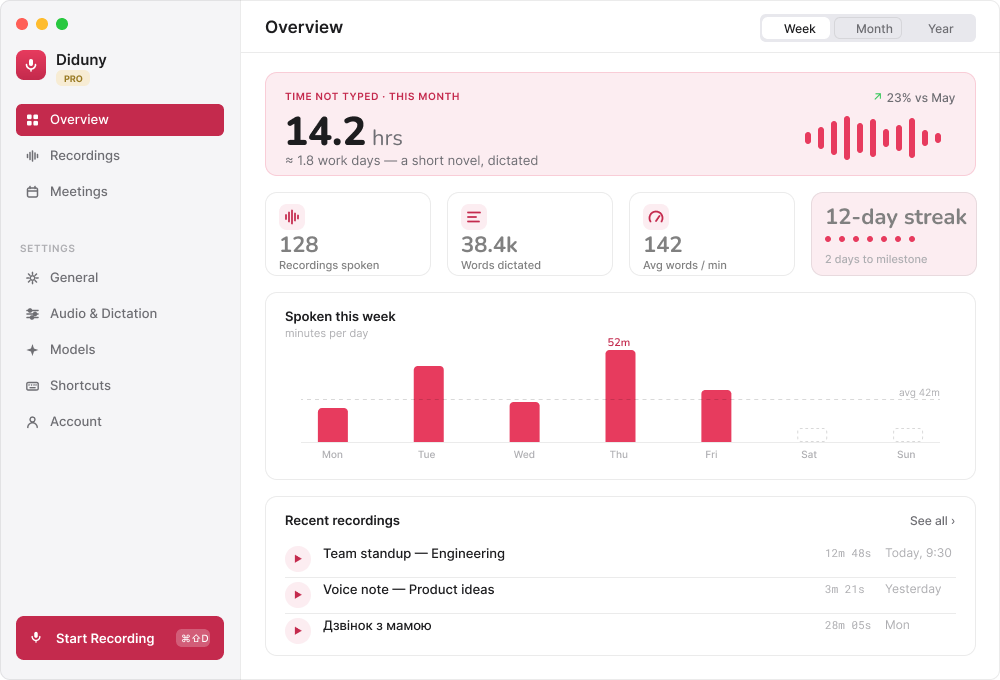
Turn speech into text in the app you use, follow a meeting as it happens, and read a live translation with supported cloud models.
Dictation, meeting recordings, audio and video files, and YouTube transcription run on your Mac. Performance depends on your Mac and the model.
Dictate into the app you use. Live cloud text lets you follow your words while recording.
Follow a live meeting transcript and return to your recording later.
Read live voice and meeting translations for supported cloud languages.
The period selector applies to Pro. Support and Cloud remain monthly.
All local processing is free.
For people who have enough with local models.
Cloud for occasional use.
For everyday work with cloud models.
Free and Support share one 2-hour cloud allowance: dictation, live meeting transcription and live speech translation. These are not separate 2-hour allowances.
The community invitation is being prepared. Members can suggest and discuss new features; delivery dates are not guaranteed.
| What you can do | Local models | Cloud models |
|---|---|---|
| Dictation in your apps | On your Mac | Live streaming transcript |
| Meeting transcription | Recording + optional live preview | Live transcript as people speak |
| Voice translation | To English, with multilingual Whisper | Live translation for supported target languages |
| Live meeting translation | Not in the current local Whisper flow | Supported cloud language pairs |
| Audio, video, files & YouTube | Local transcription · no usage quota | App imports currently use local processing |
A local live preview already exists. Local translation into English is supported; full live meeting translation uses the cloud. “Live” means text updates during recording, not zero latency.
Message formatting and server cleanup are already available without Pro. Cleanup does not consume cloud audio hours.
One payment of ₴1,500 for 12 months of Pro. No automatic renewal. Up to 3 bank payments where available; the bank’s schedule applies.
Open your selected plan in Diduny. After sign-in, the app checks the server price and shows a review before secure WayForPay checkout.
Open this plan in DidunyChoose local or cloud transcription in settings. Recordings and previous results remain available in Diduny’s library; cloud processing is configured separately.
Problem: Typing a quick thought interrupts the task already open on your Mac.
Outcome: Cleaned text is inserted into the active field after you release the shortcut.
Problem: Notes disappear when the call ends and recordings are hard to search.
Outcome: A recording, speaker-labelled transcript, and playback controls stay in the library.
Problem: Voice translation should end in text you can use, not a separate playback flow.
Outcome: Diduny produces translated text and keeps the result with the recording.
Choose Diduny when you need Mac-wide dictation, meeting recordings you can revisit, speaker-labelled transcripts, translated speech as reusable text, or a local transcription path without per-minute cloud charges.
Price and terms: Local models are free without an hourly limit. Cloud includes two free hours per calendar month. Support: ₴69 monthly, with the Free cloud allowance. Cloud: ₴119 monthly for 10 shared cloud hours per calendar month. Pro: ₴150 monthly or ₴1500 paid once for twelve months (two months free), with automatic renewal.
Diduny plan terms · Refunds and cancellation
See every way to find a toolChoose Diduny when you need Mac-wide dictation, meeting recordings you can revisit, speaker-labelled transcripts, translated speech as reusable text, or a local transcription path without per-minute cloud charges.
Diduny produces translated text. It does not promise spoken playback of translated output.
No. It is a fast dictation utility for getting text into the Mac apps you already use.
Local models are free without an hourly limit. Cloud includes two free hours per calendar month; Pro has monthly and annual subscriptions.
Use the GitHub repository issues or contact Roman directly from the About page.
The product hub for Diduny, AppCat, Papuga, and the rest of the tool shelf now runs on GitHub Pages with valid HTTPS and a real release-update channel.